Setup CI/CD For Microfronted
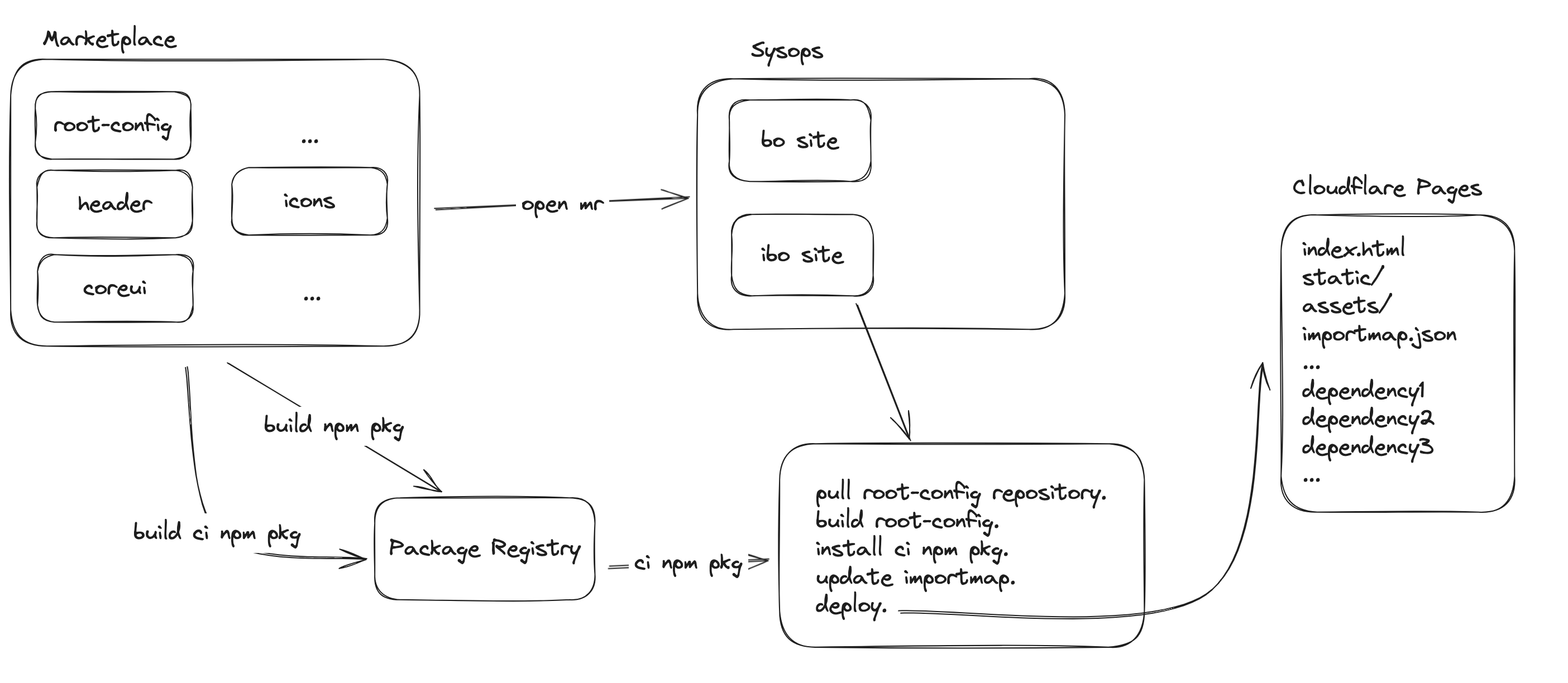
In this version, we use Cloudflare Pages instead of AWS S3 + Cloudfront for several reasons:
-
Easy to use: Just create project and deploy it, we do not setup infrastructure and also use Cloudflare to distribute contents.
-
Support Rollback when necessary.
-
Version: Thanks to automatically domain generation, now we use importmap.json per version, so do not add version in build files.
Marketplace
In this version, moving the deploy pipeline into sysops, so we can enhance security problem related to keys. Now the pipelines in marketplace only contain frontend-build-package and microfrontend-open-mr. To configure open mr job, we need to add ci.yaml in the repository.
Example for ci.yaml:
destinations:
- auto_trigger_pipeline: true
  name: nautilus/sysops
  package: '@nautilus/icons'
  jsonly: true
  service_name: ibo
  service_type:
  - microfrontend
- auto_trigger_pipeline: true
  name: nautilus/sysops
  package: '@nautilus/icons'
  jsonly: true
  service_name: bo
  service_type:
  - microfrontend
To use this, include the template file named frontend-micro.gitlab-ci.yml. If the project is root-config, add ROOT_CONFIG: "true" in variables field.
# .gitlab-ci.yml example
include:
  - file: templates/frontend-micro.gitlab-ci.yml
    project: marketplace/cicd
    ref: $SCRIPT_VERSION
stages:
  - test
  - release
  - sync
  - build
  - deploy
  - update
variables:
  SERVICE: main
  ROOT_CONFIG: "true"
  NPM_NAMESPACE: nautilus
Sysops
Add a file named importmap.yaml in sysops, which manage all dependencies and deployment configurations.
dependencies : define all dependencies for microfrontend site.
Must add root-config package in dependencies field, importmap also include it as well.
-
jsonly: allow uploading all build-folder’s files to bucket. -
suffixes: allow addingsuffixesin import key in importmap.json file.
Example for importmap.yaml:
dependencies:
  '@nautilus/main': #root-config
    version: 1.0.42
    jsonly: true
  '@nautilus/header':
    version: 1.0.20
    jsonly: true
    suffixes: [admin, auth]
Add ci.yaml to define repo and tag of root-config repository.
Example for ci.yaml:
source:
  repo: https://gitlab.nautilusgames.tech/marketplace/marine/main.git
  tag: v1.0.42-main-00000000
Structure in sysops:
├─ ...
│ .
│ .
├─ frontend
│   ├─ ibo
│      ├─ importmap.yaml
│      └─ ci.yaml
│
├─ README.md
└─ .gitlab-ci.yml
Variables
| Name | Description | Default |
|---|---|---|
CLOUDFLARE_PAGES_PREFIX | Add prefix in Cloudflare Pages project name | null |
CLOUD_PROVIDER | Choose cloud provider to deploy (Support AWS S3 and Cloudflare Pages) | cloudflare |
ROOT_CONFIG | Set true for root-config repo | null |